Windows 10 will stop receiving updates in 2025: what threats your PC will face
14 September 2025 01:18
Microsoft will release the last update for Windows 10 with Patchday on October 14, 2025, after which this version of Windows will no longer receive any updates. This could jeopardize your PC’s security, especially in the face of growing cyber threats.
What does the end of Windows 10 support mean for your PC, "Komersant Ukrainian" reports with reference to PCWorld, a popular publication that specializes in news, reviews and guides on computers and technology.
Windows 10 will not immediately become unsafe or unusable
First of all, there’s no need to panic about this date. Theoretically, Windows 10 will work indefinitely because Microsoft is not shutting down the operating system itself, but only stopping releasing updates from November. This means that you can continue to use Windows 10, but, for example, security vulnerabilities will no longer be closed.
Of course, given the growing number of cyberattacks on companies and private users, this could become a problem in the long run. New operating system vulnerabilities can allow attackers to gain access to a computer, its data, and network.
PCs connected to the Internet will be especially vulnerable. However, the built-in security features of Windows 10, including protection against malware, will remain active.
As a precautionary measure, you can completely disconnect your computer from the Internet, but this will significantly reduce its usefulness, especially at home. Overall, upgrading to Windows 11 seems like a logical step, especially since Microsoft is still offering the upgrade for free.
Real threats to Windows 10 after support ends
New vulnerabilities are regularly discovered in different versions of Windows – even years after the release. Starting in October 2025, Microsoft will no longer patch these vulnerabilities in Windows 10, so the risk of malware infecting your PC will increase every day.
Although most computers are connected to the Internet through a router with a firewall, which reduces the likelihood of attacks, there are websites infected with malware.
In addition, viruses can spread through emails and downloaded programs. If the antivirus system does not recognize a malicious file, it can infect your computer.
If your PC is actively used for Internet browsing, especially for online banking or other critical tasks, upgrading your operating system or switching to Linux, for example, is a smart decision. In this case, using Windows 10 becomes too risky.
In addition, after the end of support, third-party software developers will gradually stop releasing updates for Windows 10. This will make such programs less secure and, in some cases, completely unusable. This will not happen immediately, but it is inevitable.
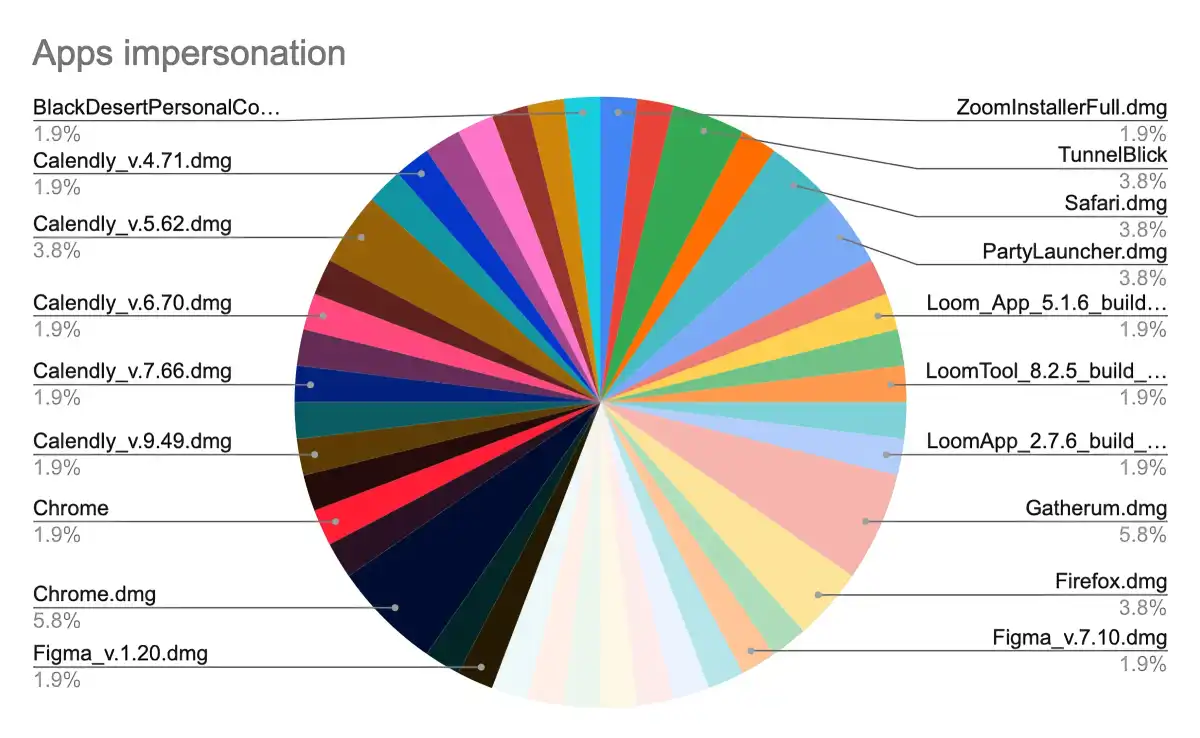 Imitation applications (photo: MacPaw Moonlock Lab)
Cybercriminals will actively target Windows 10
Windows 10 still has the largest market share at more than 60 percent, while Windows 11’s share is just over 30 percent. This means that cybercriminals will increasingly focus on Windows 10 security vulnerabilities after support ends because it will be profitable.
As soon as these vulnerabilities are known, tools and programs will appear to exploit them. From that point on, users of the outdated operating system risk losing their data.
When support for Windows 7 ended in 2020, the operating system had only 20 percent of the market. It is expected that many criminals are already working on attacks on Windows 10, if only because of the huge prevalence of this operating system.
If malware has infiltrated a PC on a home network, all data is at risk, including data on internal network storage such as NAS devices.
Can I continue to use Windows 10 safely?
Of course, there is no need to panic and immediately disconnect your PC from the Internet or network in October. If you want to continue using Windows 10, you can sign up for Microsoft’s Extended Security Updates program.
It costs about $60 for the first year until October 2026. In this case, you will continue to receive updates from Microsoft. This program will be renewed three more times until October 2028, after which updates will also stop.
An alternative that you can use now is the 0Patch security solution. This is a company that provides security updates for Windows 10 until 2030. However, the company’s cloud-based software does not update Windows 10 system files, but rather activates patches in the computer’s RAM. This means that patches will need to be downloaded every time you turn on your computer.
The software is free to use. If you want more comprehensive protection, you can sign up for a paid version for just over $25 a year.
You can also find a lot of tips on how to use the Windows 10 IoT Enterprise LTSC 2021 operating system on the Internet. This is essentially Windows 10 Enterprise with all the features, and it will receive updates until 2032, but its use as an office PC is prohibited by licensing law.
However, technically, you can safely use this operating system after purchase until 2032.
There are also many anti-malware solutions that can be used in parallel, and some of them are completely free.
For most users, upgrading to Windows 11 is the easiest option
Of course, not all devices support Windows 11, but if the installation doesn’t cause any problems, it’s worth the free upgrade. Windows 11 works very similarly to Windows 10, and you’ll continue to get security updates and new features.
Before you upgrade, make sure that all the apps and tools you use are compatible with Windows 11.
In general, it’s also a good idea to make a full backup of your operating system to an external hard drive and create a recovery disk in advance. You can do this for free with the built-in tools in Windows 10 and Windows 11.
Data monitoring in Windows 11 can be disabled using built-in resources and free tools, such as ShutUp10. Run “tpm.msc” to check if your PC has the TPM module. It is required for the update.
If the tool does not show the TPM, check the BIOS, it may be disabled. If your PC is having problems with Windows 11, it might be time to buy a new computer.