The National Bank has issued a warning about a scam: do not download any attachments
21 May 22:37
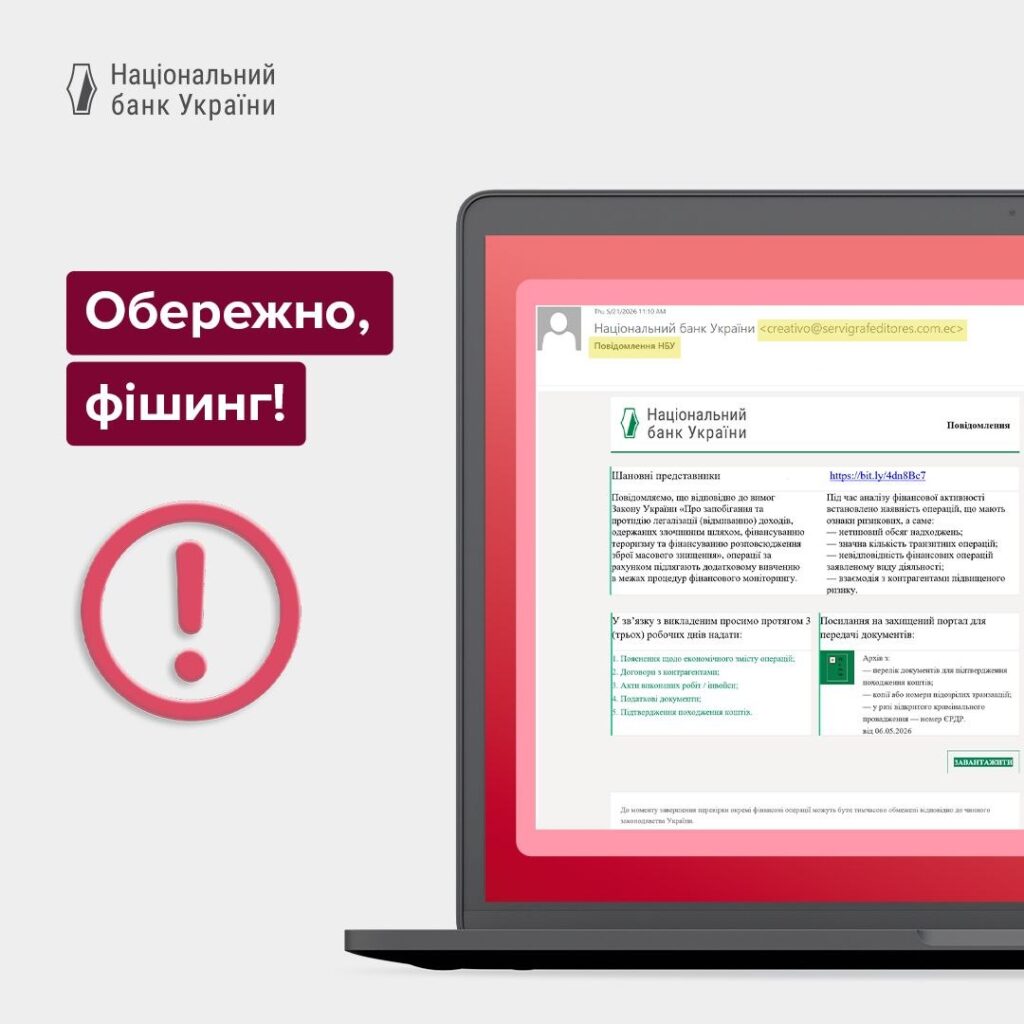
The National Bank of Ukraine has warned Ukrainians about a new scam campaign. Fraudsters are sending emails that mimic official NBU notifications and are trying to trick recipients into downloading a file containing malware, according to "Komersant Ukrainian"
The National Bank emphasizes that such emails may appear convincing, as their layout resembles the design of the NBU’s official website. However, you should not click on any links or download files from such messages.
How the scam works
According to the NBU, scammers send emails from various addresses. In the messages, they mimic the style of official correspondence from the National Bank of Ukraine.
In the text of the email, the recipient is urged to:
- click on the link;
- download the archive;
- open what appears to be a list of documents.
In reality, the archive contains malicious software. It can give attackers remote access to the victim’s computer.
Why is this software dangerous?
Malicious remote access software can pose a serious threat to the user.
Once installed, it can allow scammers to:
- access files on the computer;
- steal passwords;
- view correspondence;
- access banking or work-related data;
- install additional malware;
- use the device for further attacks.
Such emails are particularly dangerous for accountants, entrepreneurs, corporate finance departments, and anyone who works with banking documents.
How to distinguish a genuine NBU email from a fake one
The National Bank emphasizes: for email communication, NBU employees use only official corporate email with the domain: @bank.gov.ua.
If an email comes from a different address, even if it features the National Bank’s logo, colors, or design, you should treat it with suspicion.
Watch us on YouTube: important topics – without censorship
What not to do
The NBU urges Ukrainians to be cautious and not to take any actions prompted by scammers.
Do not:
- click on suspicious links;
- download attachments from unknown emails;
- open attachments from unknown senders;
- enter passwords or banking information on pages linked from emails;
- forward such files to colleagues;
- run documents or programs from the archive.
What to do if you receive a suspicious email
If you receive an email that looks like a message from the NBU but raises doubts, proceed with caution.
Recommended:
- check the sender’s address;
- do not open any attachments;
- do not click on any links;
- delete the email or mark it as spam;
- notify an IT specialist if the email was sent to your work email;
- verify information only on the NBU’s official resources.
How to protect yourself from such attacks
To avoid falling victim to a phishing email, follow these basic digital security rules:
- check the email address domain;
- Do not open files from suspicious emails;
- regularly update your antivirus software;
- use two-factor authentication;
- do not store passwords in unsecured files;
- do not install programs from unknown sources;
- verify important messages through official websites.
Read us on Telegram: important topics – without censorship